Binary search tricks
The array is probably the most popular data collection. Everyone has used, is using and will use it. If an array is sorted, you can simplify your life while processing it. We want to share a simple but effective trick with the binary search algorithm.
Imagine you have a sequence of N numbers which splits the space into N + 1 segments. The two segments on the edges are infinite. For instance, here is a fuzzy thermometer:
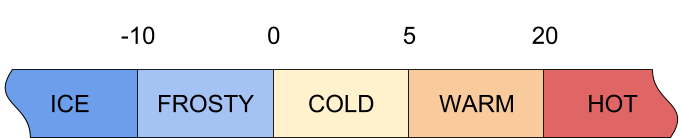
The idea is to display a single word describing the weather. In other words, this is a function which accepts a temperature as an argument (in Celsius in this example) and returns a single word as a string.
The simplest solution may look like this:
public class Thermometer {
    int[] values = {-10, 0, 5, 20};

    String[] labels = {"ice", "frosty", "cold", "warm", "hot"};

    String getLabel1(int value) {
        int n = values.length;
        for (int i = 0; i < n; ++i) {
            if (value <= values[i]) {
                return labels[i];
            }
        }

        return labels[n];
    }
The algorithm is: iterate over the array and get the label by the index of the first suitable element. It works because our array is sorted, and we know it. The complexity of this method is linear — O(n). It’s not a problem for 4 values in an array, but in general it’s not a good solution, and everyone should keep this in mind.
Well, let’s add another method which is much better than the first one:
    String getLabel2(int value) {
        int index = Arrays.binarySearch(values, value);
        if (index < 0) {
            index = -(index + 1);
        }

        return labels[index];
    }
We’re trying to find the index of the given value in the array. What if this value is missing from the array? The binarySearch() method will return -(insertion point) - 1, where insertion point is defined as the point at which the key would be inserted into the array: the index of the first element greater than the key, or a.length if all elements in the array are less than the specified key — exactly what we need!
Thus, we can check if the result is negative, and then convert it to the positive value we need. After that, we just return the label by index. The complexity of the binary search algorithm is logarithmic — O(log2 n). This means that even with 1 million elements you will find the result in no more than 20 iterations.
Let’s test this new method:
    public static void main(String[] args) {
        Thermometer t = new Thermometer();
        t.test(-15);
        t.test(-10);
        t.test(-5);
        t.test(0);
        t.test(1);
        t.test(5);
        t.test(15);
        t.test(20);
        t.test(25);
    }

    void test(int value) {
        System.out.println(value + " " + getLabel1(value) + " " + getLabel2(value));
    }
Here is the output:
-15 ice ice
-10 ice ice
-5 frosty frosty
0 frosty frosty
1 cold cold
5 cold cold
15 warm warm
20 warm warm
25 hot hot
We can see that both methods work correctly. But the second method looks much more elegant and works dramatically faster on large arrays! Full source code is available at the end of this post. Thanks for reading!
NOTE: If the value exactly matches one from the array, we associate it with the left category (e.g. -10 is treated as ‘ice’). If you want to associate it with the right category, you need to replace operator <= with operator < inside getLabel1(), and replace binarySearch(values, value) with binarySearch(values, value + 1) inside getLabel2(). In this case -10 will be treated as ‘frosty’.
Source code
Thermometer.java
import java.util.Arrays;

public class Thermometer {
    int[] values = {-10, 0, 5, 20};

    String[] labels = {"ice", "frosty", "cold", "warm", "hot"};

    String getLabel1(int value) {
        int n = values.length;
        for (int i = 0; i < n; ++i) {
            if (value <= values[i]) {
                return labels[i];
            }
        }

        return labels[n];
    }

    String getLabel2(int value) {
        int index = Arrays.binarySearch(values, value);
        if (index < 0) {
            index = -(index + 1);
        }

        return labels[index];
    }

    public static void main(String[] args) {
        Thermometer t = new Thermometer();
        t.test(-15);
        t.test(-10);
        t.test(-5);
        t.test(0);
        t.test(1);
        t.test(5);
        t.test(15);
        t.test(20);
        t.test(25);
    }

    void test(int value) {
        System.out.println(value + " " + getLabel1(value) + " " + getLabel2(value));
    }
}
Thermometer.out
-15 ice ice
-10 ice ice
-5 frosty frosty
0 frosty frosty
1 cold cold
5 cold cold
15 warm warm
20 warm warm
25 hot hot